
December 2017

Well, it's been 1 year since I went full time with my business.
Good news, I didn't go bankrupt and didn't the world didn't end. 😂
This time last year when debating going full time, I legitimately felt like I was standing on the edge of a cliff, about to leap into the unknown, no parachute attached. During my time deciding, I had this feeling inside my lungs like I had just taken a giant breath in and there was no more air to come.

Masterclass #4, the final in the series is coming your way!
The other day I hosted the last masterclasses which I'm hosting fo' freezies helping y'all who are saying
"I want to build a website, but I have literally no clue where to start"

I get it, building a website for the first time can be a little intimidating. Yeah, you know how to use one as a visitor, but building one? It's a whole other ball game.
When building a website there's a whole host of new terms you'll need to understand before you can get to the actual building.
Here's the important terms you'll want to understand, with a clear explanation even your great Aunt Helga can understand.

I'm back with another edition of monthly recaps, the posts where I take you behind the scenes of the studio, and show you what I've been scheming up, as well as the successes and the failures (*ahem - lessons learned*).
November 2017

Masterclass #3 coming your way! The other day I hosted part 3 of 4 masterclasses that I'm hosting fo' freezies helping y'all who are saying
"I want to build a website, but I have literally no clue where to start"
I put together 4 classes that all build on each other to help you go from website dreaming to website launching, no overwhelm or confusion included!
It's safe to say that my inbox has tried to take over my life, and I'm fighting back with all I have. (Know the struggle?)
I am an absolute 'inbox 0' type girl. When I have any number of unread emails over 0, I'm not satisfied until they're dealt with and gone. It's an unrelenting daily battle however, the second I manage inbox 0, give myself a little 'you did it' first bump, another 5 creep their way in waiting for my attention. Ughhhh!
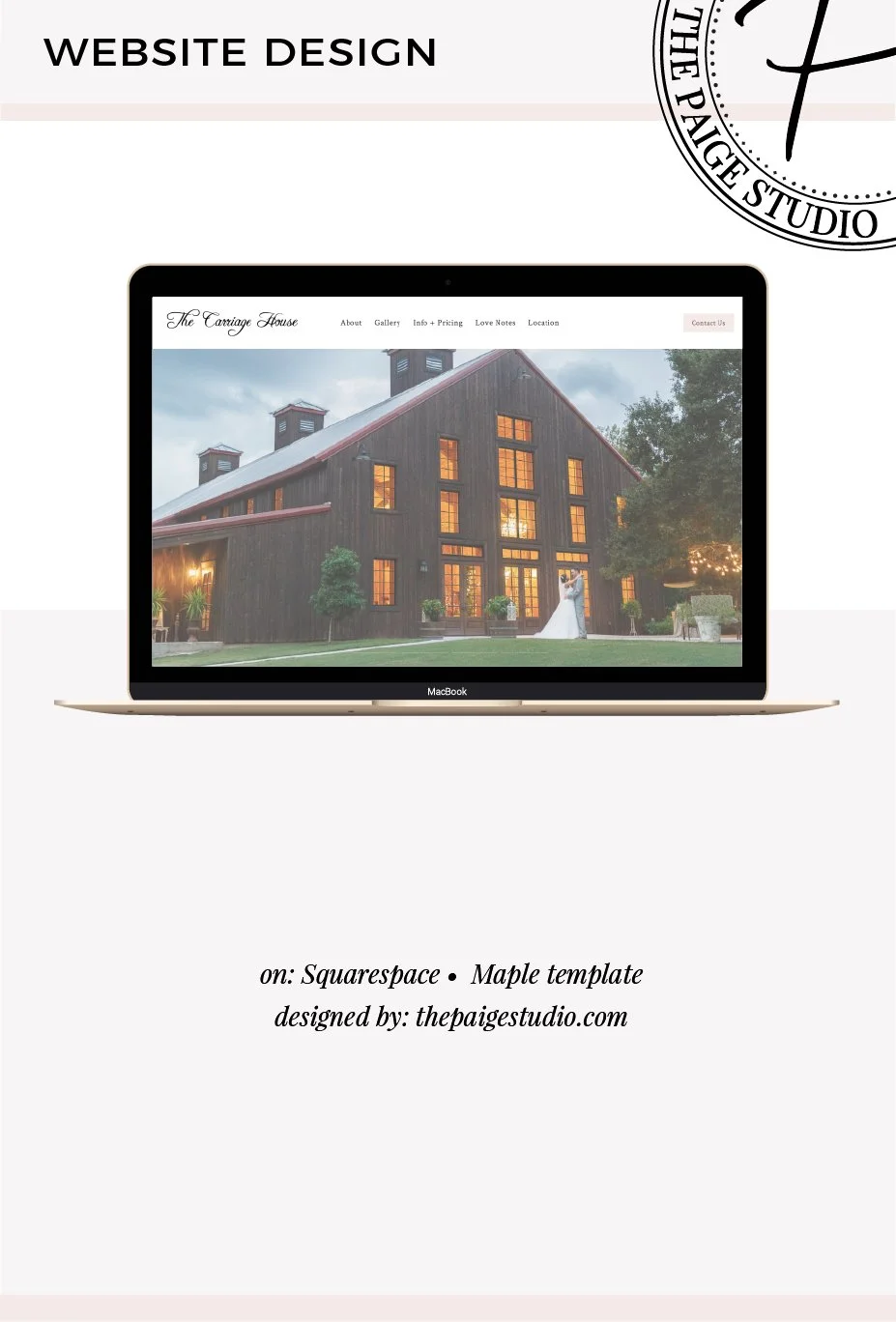
Kenni from The Carriage House, a wedding venue just outside of Houston, was inspired after a conference and decided that building a new website should be a top priority, especially going into engagement season. The conference had really spread the importance of having a professionally made website, so Kenni got in touch to find out my next available design date.
I like to get a feel for who's following along and joining my tribe, so when I check out my email list stats I tend to also do a little visit to the sites of those following me. Anyone who has a name@theirwebsite.com email I tend to check out.
It gives me an idea of the industries my followers are in, and as a website designer and web design blogger, I can take a peek at the state of the websites of those who are consuming my content.

As a Squarespace website designer, one of my absolute favorite things to do for my clients is find ways to make their website save them time in their business!
I see SO many business owners not taking advantage of the amazing website features Squarespace offers, and instead are slogging through hours of busy-work every week that could be completely automated by their website.
Masterclass #2 coming your way! The other day I hosted part 2 of 4 masterclasses that I'm hosting fo' freezies helping y'all who are saying
"I want to build a website, but I have literally no clue where to start"
I put together 4 classes that all build on each other to help you go from website dreaming to website launching, no overwhelm or confusion included!
This post contains the replay of the 2nd masterclass, where we talk about how to organize your website and create a 'roadmap' through your site to effectively get visitors to the pages that really matter!

Welcome back to another edition of business recaps! October has been a mix of lots of fun and lots of work, and I've planned & booked so many things for the coming months which I'm so looking forward to. October also continued the upward trend in site traffic which has me smiling from ear to ear.
October 2017

Y'all I'm stoked to share this with you today! The other day I hosted part 1 of 4 masterclasses that I'm hosting fo' freezies helping y'all who are saying;
"I want to build a website, but I have literally no clue where to start"
I put together 4 classes that all build on each other to help you go from website dreaming to website launching, no overwhelm or confusion included!
This post contains the replay of the 1st masterclass, where we get clear on the foundation of your site!
As a Squarespace website designer and blogger I'm often asked to give input on if Squarespace is right for my potential clients and blog readers.
I've answered this so many times now, I figured I'd just blog about it, so the answer is available to anyone.
Oh, and no, even though I am a huge fan of Squarespace, I don't recommend it to everyone.
There are different web building platforms that are suited to different circumstances, so I'm going to break my opinion down honestly as to which platform makes the most sense for your business.

I will be the first one to say that blogging for my business has been the key to growing my business and ultimately the success I've had so far.
I publish a new blog every single Tuesday & Thursday, and have for months now.
In fact, I'm quickly coming up to 1 year of consistently blogging twice a week.
(For anyone who's attempted consistent blogging, you can imagine what a challenge that has been!) When I do indeed hit my 1 year of consistent blogging, I'll be sure to publish a post on it to let you in on the strategies I use to ensure I'm publishing consistently.
Let me guess, when you started your business your days were filled with juggling writing blog posts, working on client projects, sending invoices, and then 3 PM hit and you remembered, ‘oh no, I haven’t posted on Instagram in a week!’
Your to do list started to dictate your life, and as a solopreneur, all the tasks were on you to complete. Team? Nah, there was no team to pass different parts of your workload off to. Just you slogging at your to do list every day.
It's getting to the point where you're racking up a nice hefty list of testimonials from past clients and customers, eh? So, you're wondering, how exactly should I put all of these rave reviews on my site, without filling valuable site space with row after row of testimonials?
Do you add a new page, or just continue to list lots and lots of testimonials down your sales or services page?

Every Monday is my 'Biz Tasks' day where I track alllll the stats of my business.
Finances, website stats, social media, email list, all those good things.
Call me crazy but I have to say, I legitimately really look forward to my Monday morning stats tracking!
I love seeing the numbers grow each month and looking back at the stats week over week of how far I've come since I started my business. Looking back on these numbers really keeps me motivated when the going gets tough.
So you’ve got a longgg page, and you’re looking for a way to help your visitors quickly skip to the content they most want to see?
Jump-to links, sometimes also called ‘anchor links’ are what you need then!
Now, because they’re called anchor links, I’m of course going to get all nautical on you, and drop as many sea-worthy puns in here as possible!

Welcome back to another edition of business recaps! September has been a mind-boggling month, and I have so much I'm looking forward to for the rest of the year which I'll share here!
I'm sick today, so this post is coming to yeh from the cozyness of my bed, but even on a sick day, I'm stoked to write this post because my business recap posts are always my fav to share with y'all!
September 2017

Pre-S: After you read this post, I have a question I'd really appreciate you answering for me! You'll find it, poll-style at the bottom of this post! Your answers will help me determine if I should chat to y'all more in the future about ShowIt.
Alright y'all, I admit, I've been unfaithful. To Squarespace. (Sorry, Squarespace.)
You may or may not have heard of the website builder ShowIt. It's newer to the website builder game, and is a smaller company, so I wouldn't be surprised if this is the first you're hearing of it.
Oh hey friends, I'm back with another little Squarespace hack for yeh!
Know how on websites you'll commonly see a bunch of logos, side by side stating where the website owner has been featured, or the past clients they've worked with? It generally also has a colored background to really make it pop on the page too.
This 'logo stripe' as I'm calling it, is fab for showing social proof. Logo stripes are a quick and easy way to say 'I'm a big deal' without having to say it out loud and look all self-absorbed.

So, you're all ready to build your site and you're getting around to picking out or take photos for it? Or maybe you're thinking of building a new site soon, and are just doing your research to get prepared for when the big site build comes?
Either way, today's post is for you!
Before I go even one step further, I have an insider web designer secret for you.
So you’ve decided on Squarespace and that DIY’ing isn’t your thing? Great, it’s time to find you a Squarespace website designer who can take over building the website of your dreams!
Finding the designer who fits your style, timeline and budget can be a little tricky however, so I’ll go through the most common places you can find Squarespace designers to get you started on your hunt.
I’ll also load you up on some insider tips on what type of designers you’ll find on each!

The process of designing your new website could be an absolute dream come true, or an ongoing nightmare.
Who you pick to help you along the way and build your site for you will make all the different to both the end product, and how much you enjoy the site build process.
So let's get you all educated so you're set to pick out the perfect designer who will get you website-launching and having a blast along the way!
Google Analytics or Squarespace analytics can only tell you so much. They can tell you what pages are popular, but not how site visitors are getting places, or if they're getting stuck on the way to find the info they want.
So you've got a website, and are wondering,
'What exactly are visitors doing while on my site?'
'Are my Calls To Action working?'
'Are people finding the info they need, or getting lost along the way?'
'Is anyone even clicking that new opt-in gift I put on my home page, or would that real estate be better used?'
The Squarespace Style Editor is something every new Squarespace user should get familiar with, as it enables you to change so much of the look and style of your site.
When you're first building your website, you'll spend lots of time in the Style Editor, but down the line in the years ahead of using your Squarespace site, you'll most likely leave this bit alone, as it's really not necessary to give your site a constant face lift.
Before we get even one step further, I want to explain exactly what your Style Editor controls, versus your template, or Squarespace blocks.

I must say, I'm really getting to like these business recaps, I've been excitedly thinking about what I'm going to write all month long!
Let's start with the numbers, then get into what's been happening business-wise, then I'll follow up on how I did on my goals from this past month, and what I have coming up next month!
August 2017

Rebecca had worked both abroad and online teaching English for a number of different schools, and now was really wanting to start up her own English lessons service and website.
She wanted a place to send new potential clients directly, as well as be able to take payments and have students book class times, all easily online in one place.
Rebecca wants for her students to have fun while taking her classes, and so she wanted her site to be the very opposite of the typical, corporate language learning services you'll find online. Rebecca wanted to begin differentiating her lessons from all the others out there with a fun, modern design.

As you know, a few weeks back I completed my first studio reader survey and I'm oh-so-glad I did. I can't tell you how helpful your responses are to me determining where to steer this business next!
I had a rather head-smacking and hilarious revelation from tallying up the results of this survey, which I'm going to tell you all about in August's business recap (you can see July's business recap here).
So, if you want to know all about that semi-embarrassing story, be sure to subscribe to hear the story when that post goes live!

I don’t know about you, but I personally LOVE taking a behind the scenes peek at the tools and programs other online entrepreneurs are using to run their online empires. You too? Okay fab, this post is just for you then!
I recently created a Tools page, loaded with the services, courses, and books that makes this studio run on a daily basis, and guides my education and decision making.
I give a quick description for a lot of the services on the Tools page, but I also wanted to get a bit more in depth with you on a few of those tools and show you exactly how I use them. Hence, this post. (… Apparently I’m feeling very Renaissance today?)

Dara is the owner of Sequel Professional Development based out of beautiful Hawaii. Dara wasn't looking for a traditional, corporate looking website, but instead wanted something more casual, welcoming and infused with tropical vibes, incorporating her location into her online home.
Dara choose the 2 Week Website + Brand package, so we whipped up her Squarespace website, alongside an updated and modernized logo that fit her brands overall feel better, as well as business cards and social media graphics.

In terms of experts in Squarespace SEO, Kerstin Martin is right up there at the top of the list. Kerstin is a fellow Squarespace website designer, and educator, with a number of courses all centred around Squarespace.
I asked Kerstin to write a piece for y'all because I know she has some amazing SEO tips up her sleeve that we can all benefit from, so thank you kindly Kerstin for sharing your wisdom with us all!
I'm sure you'll agree, Kerstin knocked it out of the park with this very much so lesser-known Squarespace SEO tip!

Recently I realized that while I've racked up a perfect 5 star review record, the testimonials I was receiving were only halfway to where I wanted them to be.
Knockout testimonials are little trust-building gems, and they can be extremely persuasive when used on sales/services pages.
Truly great testimonials help potential new clients to see how your service/product helped another in their same situation achieve the goal they're also hoping to achieve.

If you’ve been following along, you’ll know that I just recently ran a reader survey.
I loved hearing your responses, so if you took the survey, a big great thank you to you for completing it.
While I did recently run a time-bound survey, I actually also have had one running in the background for months.
In this post I’m going to tell you all about the good and the bad of both, as well as which I’d suggest.
This is one of my fav Squarespace hacks to give sites an extra special look!
It's a very simple, no coding needed, hack of the banner image and parallax scrolling on any template in the Brine family. With this hack you can make your content appear to parallax scroll at two different speeds.
Here's an example from one of my recent clients on sequelpd.com.

So gal, I’m test driving something new! Monthly recaps in business and life you could call them really.
Here’s what led to this new idea.
I’ve been dealing for some time with trying to find the proper solution to the question; ‘How much of myself should I share in my business?’
I love getting to peek behind-the-scenes at my fav fellow entrepreneur gals and bloggers lives. I feel like I know them so much better, and want to work with them so much more because I feel like I truly know them as people.

One common design element you'll find on my site, in opt-in gifts and now and again on my blog post graphics is custom icons, created in my brands colors and style.
My icons are a bit more complex and detailed than most, so you would expect it takes me forever to create one right? Thankfully, that's not the case at all!
Each one takes me under 1 minute to create!
(So great right?!)
July 2017

So, you're in the middle of picking a Squarespace template and want to know which templates have what features?
Well perfect, you're in the right place!
Before we start, I want to mention two superrr handy resources that are perfect for when you're just getting started with building your Squarespace site (or are switching templates).
First, there's the Start Your Squarespace Website Workbook which gives you a clear guide on how to use this list and pick a template, how to determine your site goals & what to do with them, and how to properly use your inspiration sites!
So you don't have a full website yet, but you want to start building your list and delivering an opt-in gift?
People often use Leadpages for this type of thing.
It’s exactly what Leadpages was built for, so it’s the obvious first choice.
But as you may have realized after a quick bit of research, Leadpages costs at minimum $25.00/month.
I’m going to introduce you to a cheaper option than Leadpages, that allows you to collect emails before you have a full site.

Fun fact: I completed both an undergrad and Masters degree, and then went on to not use even an ounce of what I learned in either when running my own business.
That is, with 1 small exception. I had taken a class in my Masters called Survey Design & Evaluation which came in handy when I went to design my recent reader survey.
(Glad those degrees *ahem - massively expensive pieces of paper* finally came in handy 😂.)
So I've packaged up my knowledge and placed it here for you to use when you're ready to also give out a survey of your own!

You may have noticed a couple changes around here recently.
My home page, about page and work with me pages got brand spanking new copy in the past couple weeks.
Here’s why I decided to give them an update.
I realized when taking B-School just how vital being able to write copy that connects with my ideal clients that also converts was.
After finishing up B-School my top priority was to figure out what to do about my copy.
"Students, please grab out your pen and a piece of paper. It's test time!"
No really, I want you to score your site for just 1 moment here.
Here's what you'll be tested on:
Your websites Calls To Action (or CTA).
This is how it works.
Every page on our sites needs a CTA.

Oh hey beautiful blog reader!
I've been feeling something lately and wanted to share it with y'all. Blogging for you and helping you out with your Squarespace sites is an absolute pleasure, I love doing it!
But sometimes in blog-world, the conversation feels a little one-sided. It's kinda like when you apply to 43 jobs online, submit your application online, and then it falls into a big black hole and you never hear anything back.

Ahem - story time!
Just a few years ago I was Googling up a storm, wanting to build a website and was struggling to find the right platform.
I scoped out all the options and looked up all the comparison charts.
I tried to learn a little about how each website building platform worked, and what creating and blogging on them would look like before I settled on one.
Squarespace ended up winning my heart, and years later, I'm still a huge fan of the platform.

Amy came to me with an exact knowledge of what she was looking for.
This came as no surprise as Amy is a professional Creative Director, having worked with a couple small brands you might have heard of before 😉; Victoria's Secret, White House Black Market, Revlon, Vogue Mexico, Harper's Bazar, Target, West Elm, Bloomingdales and William-Sonoma, just to name a few.
Amy was looking for a site that gave off a chic, elevated, stylish, fashion oriented vibe and had a very clean look overall.
June 2017

So you've got something to sell, and would like to give your customers both the option to purchase it one time, or recurring subscription style on your Squaresapce site?
Can do friend!
I'm going to walk you through exactly how this is set up.
The Squarespace e-commerce system doesn't have the ability to make subscription-style recurring sales, but MoonClerk, a 3rd party integration that works with Squaresapce does, so that's what I'll be showing you how to use.
Okay so before I even start on this post I need to give credit where credit is due.
The 2 week website was not my idea! (Though I do love it and am so darn happy I found out about it!)
The idea came from the fab Lauren Hooker who runs Elle & Company, or more specifically her husband Jake. Jake thought of the 2 week website, Lauren implemented it and then she shared it on her blog, advocating for others to considering switching to the 2 week process.

When I get on the phone with potential clients for our initial consult call, a few common questions come up about just what is included in my packages.
95% of the time when a potential client asked if something was included my answer was ‘yes.’
As such, I started describing my packages as ‘all-inclusive.’
(Partially because my answer was almost always yes, and partially because I love vacations, and being reminded of them often).
So, as with all the client and reader questions I get, I blog about it!

You settled on Squarespace for your website, fab choice friend!
Now you only need to ... you know, build the thing.
Hoping to see some example Squarespace websites for inspiration? Want to know what's possible with each Squarespace template?
I've got you gal! In comes the
So you’re thinking of joining B-School? I take it that you’re reading every B-School review online you can get your hands on? I hear yeh, that was me too.
Gal, I know. B-School is quite the business investment, so it can be a tough decision.
To help you in your decision making I’ll be giving you an insider look at what going through B-School is like. (Because that’s what I really wanted to hear when I was considering enrolling!)
B-School has 6 modules spaced over 8 weeks. I took notes at the end of every week to share with you in this post, to give you a feel for what each week looked like. I’ll also let you in on what was happening in the B-School Facebook group, as well as my personal business breakthroughs.
May 2017

You got a new website - YAYYYY!
Virtual high five gal! Job very well done making the leap and going live with a fab new online home.
So, you spent all this time and money on your new website to make your business look legit, now you want to shout it from the rooftops? I hear yeh.
Here’s a few ideas on how to throw a virtual launch partay to let everyone know that your new website is live!
I just wrapped up such a fun interview with the one half of the Bucketlist Bombshells, Shay Orlena Brown.
(Is doing interviews like this one my real job? Apparently yes it is. I know, sometimes I'm surprised by it too.)
Together Shay & Cassie make up the Bucketlist Bombshells. The Bucketlist Bombshells is the online destination empowering and teaching millennial women how to build a successful online service-based business that gives them the freedom to travel the world and live creatively.
When I came across the Bucketlist Bombshells on Facebook my first thought was 'no way, is that a real thing?'

Charging premium prices is every business owners dream.
To charge crème de la crème prices however, there’s a few hurdles we need to get past first.
A few of these I can easily point you in the direction of resources and systems you can set up to prep for charging premium pricing (and I will!). A couple however will be bits you have to look internally for, and truly understand your industry to successfully complete.
I'll also share with you one commonly accepted thing people believe is necessary to charge premium prices, that really isn't required as most of us believe.
All entrepreneurs lust after a stunning new website, a site oh-so modern and clean that their visitors will love.
Of course, it is a dream for many entrepreneurs to team up with a web pro to bring their site vision to life. But, a custom-made website is big investment, and sometimes seen more as a ‘would be nice’ investment, rather than a must-have investment.
But what if I told you, a new website would save you time?
Ah yes, now your interested, aren’t you?
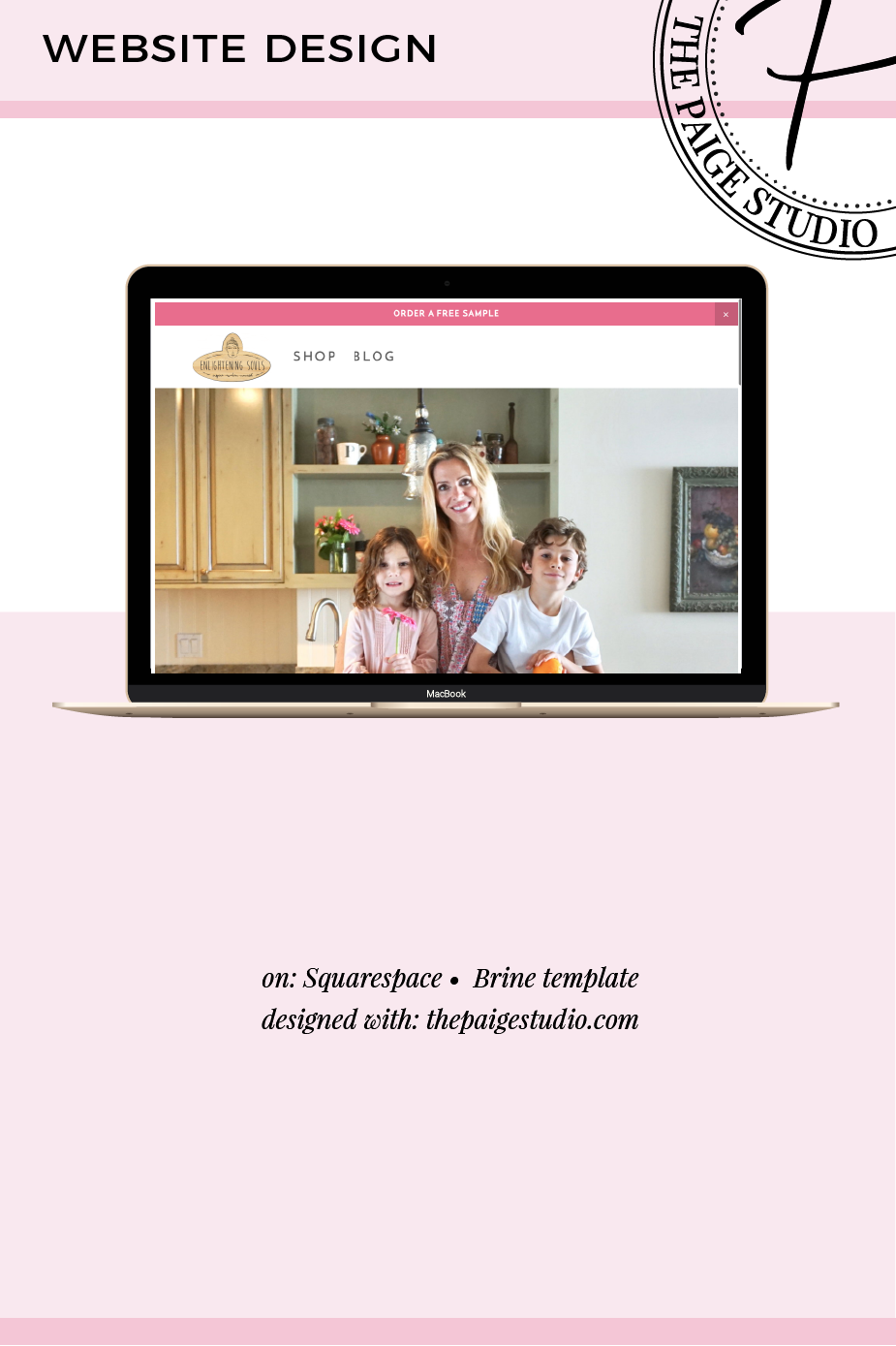
A fellow B-Schooler, Peyton, got in touch because she needed some fancy new functionality on her Squarespace site. Peyton had already built out a number of the site pages herself, and did a truly wonderful DIY job!
She was getting caught up on how exactly to sell her debut product, Soul Power Nutrient Boost For Women, both through her Squarespace e-commerce online store, and also sell it subscription-style monthly. Peyton also asked for a little site spruce up; for me to use my design eye to tweak the work she had started.
So you’re about to enter unchartered territory in the field of hiring a web pro?
First, congrats!
This is a major investment in your business, and a real turning point for a lot of businesses and entrepreneurs. You will no longer be the newbie, DIY entrepreneur. Getting your business set up to look legit online is an exciting move forward for every business.
Figuring out how the heck to set up your online presence is no easy task, thankfully a web designer can make the whole process a lot easier and more enjoyable for you. So you can get back to other important things … like you know, running your business, which Imma bet is, you know, a full-time job in itself.
My web design business started in a rather odd place. It all began in a swamp in Mississippi.
Unusual place for a tech business to start? Indeed.
While completing my Masters at Ole Miss (in something that was completely unrelated to web design and online business) I went on a class trip.
We visited a local non-profit camp that educated the youth of Mississippi on environmental education. Having spent plenty of time in class speaking about the challenges organizations face, it was our goal to learn about their organization, and their real-world challenges of running a non-profit.
April 2017

Getting your website deigned is both an exciting move forward for your business, and a big undertaking.
Every web designer you meet will have a different process, turnaround timeline, prices, payment terms, design style, etc. The list goes on and on. Understandably, it can be a long process to find a designer who is the perfect fit.
When I chat with potential clients, there’s a common list of questions that come up.
With every aspect of my design studio, I try to make the process as simple, and headache-free for clients as possible.

Want the back stage pass to my business organization and scheduling? Well here it is gal!
I've shared bits and pieces of my processes and what my week/day looks like before, but never gave the full run down and reasoning behind it all.
My current schedule and structure was one that took a while to nail down. In fact, I think it's safe to say that in my first two weeks full time, my business was a bit of a hot mess.
Not anymore!
Ever been working on your website and thought to yourself ... 'hmm, wonder what the best way to arrange all of this content is?' 'What pages should be in my navigation, and which shouldn't?' 'Where should I place my opt-in gift so it's most effective?'
Website content strategy helps us with all of these questions.
It helps give you a strategy for where everything on your website should go, and how to get visitors to navigate through your site in the way you want them to!
(*Ahem* That means getting those fine folks onto the pages which make you the dolla dolla bills!)

This year for the first time ConvertKit conducted a survey of bloggers, compiled the results and released a State of the Blogging Industry report. The report compiled the information of over 850 bloggers who fall into the professional bloggers category and the not-yet-professional bloggers category.
With the intention of learning from the very best in an industry, when reading the report I kept my sights on where the professional bloggers habits differed from the not-yet-pro bloggers. There were 5 major takeaways I found which I could directly apply to my blog, and apply them I have! (To ever-increasing success with my blog and business I might add!)
Ah yes, the Squarespace vs. WordPress debate. Which is right for you?
In this post we're going to get into specifics of whats different between the two platforms so you decide exactly which fits you best. If you want the spark notes version, which you ultimately choose mostly boils down to 2 things:
Your tolerance level for technology problems, and how much of a stickler you are for control & customization.
Oh and budget, budget comes into play a little too.
So, in this post I'm going to walk you through where Squarespace and WordPress are different, so you can get a clear picture of what using each will be like. I know, you're currently (naively) assuming; "they both build websites, how different can they be?"

Email.
Basically the running-your-own-business equivalent of a mosquito in your bedroom in the middle of summer. It's always present, but never welcome.
In fact, it's an ongoing nightmare at times.
If you find your email is sucking the life and time out of your day, then this post was written just for you.
Implement a few of these suggestions and I can guarantee you'll cut your time spent in your inbox, dramatically.
So, let's reclaim your freedom from your inbox already, shall we?

You’re looking into the possibility of working with a designer to bring your fab new site to life, congratulations! That’s a big step into the legit business world, I’m so happy for you!
The vast majority of my clients describe figuring out getting a new website as ‘overwhelming’. I know you have enough things on your Thanksgiving-sized plate already, so we’re going to break this down really easily.
I’m going to lay out a clear set of to do’s and questions to answer in order for you to get the site that’s right for your business.
Imma give you some tips, straight from the mouth of a web designer, on how to tackle this mountain, properly. There’s just 4 steps, that’s not too rough, right?
Running your own business can be a roller coaster of emotions, and my recent highs and lows trying to define my ideal client avatar (a.k.a. ICA), (sometimes called an ideal client profile) is a prime example.
I joined Marie Forleo's B-School where we went deep with ICA's. (Full B-School review to come, keep an eye on the blog for that). I had already created an ICA previously so I felt 100% ready to roll with 'Victoria' (my old ICA) and fly through that part of the course.
Oh-hell-no was I wrong!
After a Mastermind call with fellow B-Schoolers I realized they knew significantly more about their ICA's than I did mine. They had dove more deeply into their ICA's feelings and thoughts on the world, which of course, affects buying preferences and decisions a whole lot more than their hair color does. (Unless you're selling hair dye of course, which unfortunately, I'm not).
March 2017
Getting going with designing your own website? Don't really have a lot of experience or education on the matter? All good girl, I'm going to give you a quick & easy list of do's and don'ts when it comes to creating that fab website.
Within the web design community there's a generally known set of best practices to ensure your website is as appealing and effective as possible. I'll give you the quick run down here, so you can feel confident you're making decisions based on whats most effective, and not just personal preference.

Hate your Squarespace templates blog layout? No worries! We’re able to completely change the blog layout and design, no code involved. This takes a few minutes to set up in the beginning, and then in the future involved 5 seconds per post to keep it working.
We’ll be using the Squarespace summary block along with blog post tags to completely restyle the blog layout to your preferences.
Here’s two examples of a couple layouts you can master.
Have something on your website you want to bring attention to and draw a visitors eye towards? Maybe something you really would like your visitor to click on? Add some movement to that item!
"But isn't making stuff move on a website hard ... and involve coding?"
Well it could, but I have a super-simple method using just the regular Squarespace blocks to fake movement on your website.
Here's an example using portfolio pieces.
What is Squarespace?
Squarespace is, in the most basic terms, a website building platform. Squarespace has built a reputation on being an all-in-one system, that’s easy to use. Squarespace is well known for it’s designer quality templates, and modern features (all websites are mobile responsive, right from the get go).
Who is Squarespace good for? What about WordPress? Which is better?
There is no overall better, there is however, better depending on your specific needs and organization type.

The team at Macht Architects was transitioning into a family business, and with a new generation joining up, it was time for a revamp of the brand and the website. The Macht Architects team designs sustainable, energy efficient, healthy homes. As I quickly learned from browsing through their imagery, the homes they design are not only built in an environmentally conscious manner, but they're also truly breathtaking.
February 2017

I have two tricks to share with you today which are quick & super-easy to implement that will increase your websites Google rank!
You heard that right; quick, easy & improves Google rank! Not bad, eh?
I'll take some extra Google juice for something I can do in under a minute! You too? Okay great. Here's my two tricks.

Squarespace tags and categories may be used in many creative ways to display your website content in a variety of layouts and designs.
'How do I properly use tags and categories?' is a frequent question I hear, so I thought a complete guide was needed. You'll find in the video below I go deep into all the many ways to use them, to solve some common Squarespace struggles.
If you're looking for a specific answer, here's the video jump-to points.

Here and there when desining your Squarespace website you might run into something you'd really like to create, but aren't quite sure of how to make it happen. Thankfully, some ingenious bloggers have come up with some fabulous workarounds to many of the common issues Squarespace users face.
This list compiles the very best of them.
January 2017

Facebook groups, blog comment sections and Quora are all stocked full of questions about Squarespace.
Squarespace websites are the talk of the town these days, and for good reason! It's easy to create a truly stunning design, they're easy to launch, and the websites produced are indeed very powerful.
It's a big decision to choose or switch your website system, so I wanted to be the one to lay out all the most frequent questions and the answers to them in order to set things straight.
I have no intention of getting into the WordPress vs. Squarespace battleground as that horse had been beaten to death a million times over. But I DO want to let you know what Squarespace is capable of, in one convenient location.

You walk into a restaurant. Every seat is empty, two staff at the grimy counter are deep in conversation, scrolling through their phones, ignoring you completely. The furnishings are a mish-mash of disorderly rickety tables and spindly chairs, complimented by fraying posters on the walls hung slightly askew.
Would you eat there?
Nope! You’d be afraid your chicken might actually be mystery meat.

Glam on Wheels is a mobile salon. (First thought: Didn’t know that existed unless you were a celebrity!) When speaking with the founder of her business, I immediately thought ‘why don’t they have this where I live?’
Fully on board with her business idea, we discussed all the necessities of the website and the style she wanted communicated throughout. We went for a mix of high-end and modern fonts, alongside full width banner images and galleries to make a stunner of a website.
After a lengthly call prior to the start of the project to get on the same page, this was a very quick & easy design process. After sending back the website for review, there was hardly an edit to make!

Dawn from Hudson’s House of Play had DIY’ed her Squarespace website but wasn’t completely happy with what she had produced. Hudson’s House of Play, a very new, but already very successful indoor childrens playspace, needed a website that showed off really how wonderful the space and the company was.
She wanted the website to give the feel that Hudson’s House of Play was a child-centered space, but still wanted the website to look professional, and appeal to the parents maturity too.
Dawn had a few very specific ideas she hoped to see in the website (the style of the footer information, the inclusion of a black and white awning and some icons on the home page), but otherwise left me with creative freedom.

I consistently blogged for 1 year, wahoo! I posted twice a week, on Tuesdays and Thursdays without fail for 1 year straight, definitely something I'm proud of from this past year.
I was paid back handsomely with a massive uptick in traffic which I 100% dedicate to my consistency. (You can peek at the exact traffic numbers 1 year of consistent blogging earned me over in this post.)